Search opportunities
Know what to write next
For business owners with a blog and a Google Search Console account. Blog AI reads the searches your site already shows up for and turns them into one ranked list: posts to write, posts to fix and search snippets to rewrite, each with the extra clicks it could bring. Sign in, connect Search Console, and your list appears after the first sync.
Sign in with Google, no card needed. The free plan includes a content audit and one free post once Search Console has synced and you've set your voice. Plans from $49/month.
Your best ideas are already in Search Console
Google Search Console is Google's free tool for site owners. It records every search your site appeared for, how many times you were shown (impressions), how many people clicked, and your average position in the results.
Most owners never open it, or open it once and find thousands of rows with no obvious next step. The answers are in there, though. A search where you sit at the bottom of page one is a post that needs a nudge. A page that is shown often but rarely clicked has a weak title in Google. A search you keep appearing for, with no post about it, is a post you haven't written yet.
Blog AI reads those numbers for you every day and turns them into actions. It compares the last 28 days with the 28 days before, so it can see what's rising and what's slipping, not just where you stand.
The five things it looks for
Each finding has a fixed rule, so you can see why something is on your list. These are the thresholds the product uses today.
| Finding | The rule | What it suggests |
|---|---|---|
| Close to page one (striking distance) | An average position between 4 and 20, with at least 100 impressions in 28 days. | Refresh or expand the page that ranks, so it can move into the top few results. |
| Shown but rarely clicked (low click rate) | On page one (position 10 or better), at least 200 impressions, and a click rate below 50% of what's typical for that position. | Rewrite the title and description people see in Google (free, once the post is four weeks old). |
| Losing traffic | At least 20 clicks in the previous 28 days, then a drop of 25% or more. | Refresh the post: update what's out of date and add what's missing. |
| Your posts competing with each other | Two or more of your pages, each with at least 10% of a search's impressions and ranking in the top 30. | Merge them into the strongest page, so Google has one clear answer. |
| Searches with no post | At least 100 impressions, but none of your posts in the top 20 for that search. | Write a new post about it. |
Striking distance means searches where you rank just off the top spots: close enough that a better post can realistically climb. Cannibalisation (the SEO word for your own posts competing) means Google keeps switching between two of your pages for the same search, and neither does as well as one combined page would.
Ranked by the clicks each change could bring
A list of fifty problems isn't much use. Blog AI estimates, for every finding, how many extra clicks a month fixing it could bring, and puts the biggest first.
For a striking-distance search, the estimate is the number of times you're shown multiplied by the gap between your click rate now and the typical click rate at position 3 (about 11%). For a post that's losing traffic, it's the clicks it has lost. The same idea runs through every finding: how much is on the table, in clicks.
A refresh or fix worth fewer than 5 clicks a month is left off, because it isn't worth a credit. And one post gets one action: if a post is both losing traffic and rarely clicked, you'll see one refresh, which also rewrites its search snippet, rather than two separate jobs.
Home and the Actions page
The Actions page lists every opportunity, ranked by estimated extra clicks; Home shows the top three under “How to get more clicks”. Each card shows the finding in plain English, the numbers behind it, a 56-day chart of the page's clicks, the estimated gain, what acting on it costs, and one button to act.
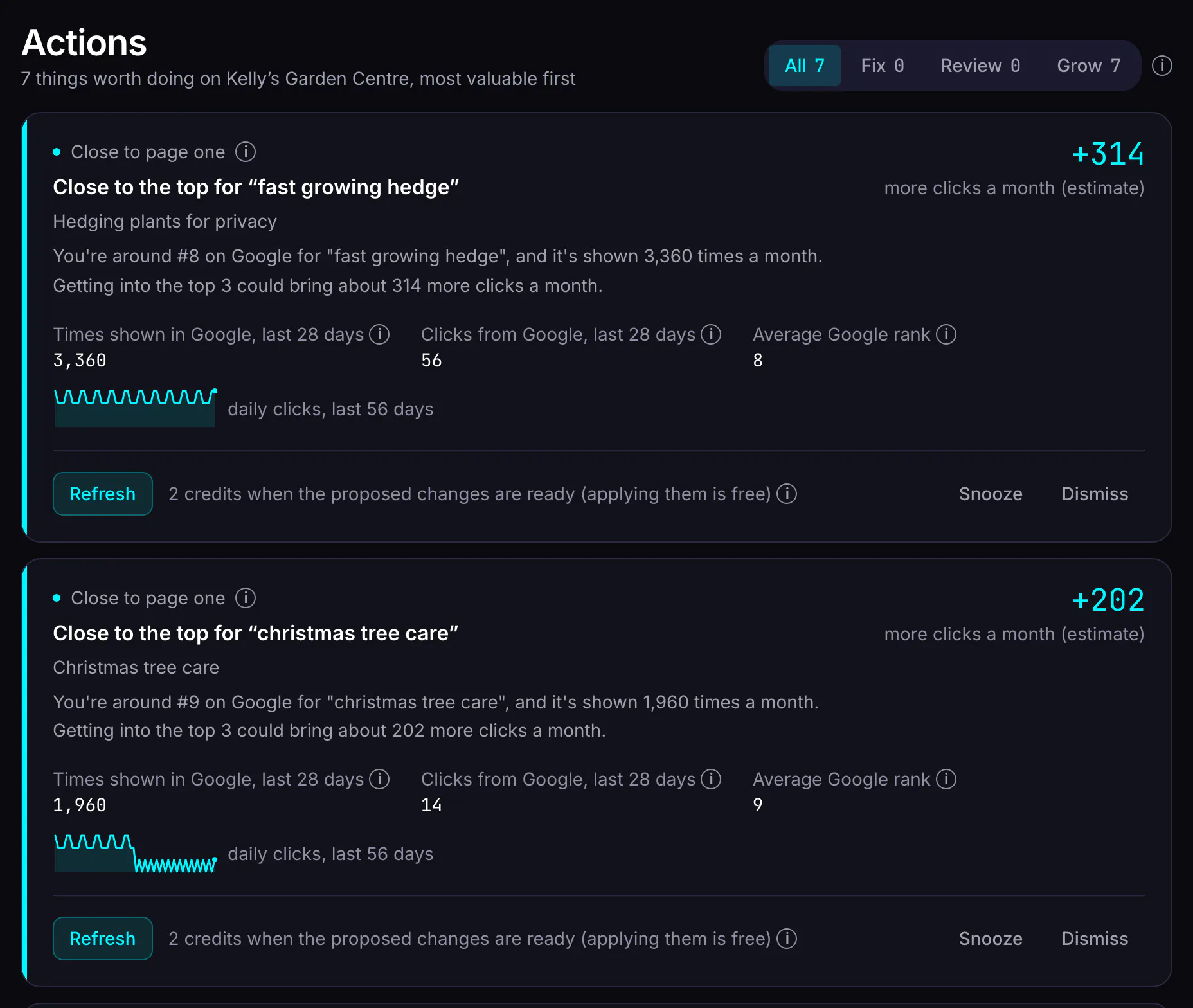
- Generate: starts a new post aimed at that search. You'll see progress on the card, and the draft opens when it's ready.
- Refresh: starts a section-by-section rewrite proposal for a post, which you review before anything changes on your site.
- Better title & description in Google: suggests new search titles and descriptions, free.
- Refresh on competing pages: merges them into the one that's doing best.
Some things jump the queue because they block everything else: a Google connection that needs reconnecting, a scheduled post that failed to publish, or a draft with fact-check flags waiting for you. On Home, the broken ones show as a banner at the top. Anything you don't want to act on, you can dismiss, or snooze until later.
Post ideas from the same data
When you want a few topics to choose from rather than one action at a time, ask for a batch of ideas. Blog AI gives the ideas step the site's strongest findings (searches with no post come first, then striking distance), your existing posts and the ideas already in your queue, so it doesn't suggest something you've covered.
Each idea comes with a title, two or three sentences on why it should work for your site, and suggested keywords. You approve or reject each one. Approved ideas wait on the Ideas page until you write them. A batch costs 1 credit.
What Blog AI reads, and how
Read-only access
You connect Google from the Sites page. Blog AI asks for read-only access to Search Console and, optionally, Google Analytics 4. You pick which property belongs to which site, and Blog AI checks the site's address is inside that property before saving.
History as well as today
The first sync fetches recent days first, then works backwards through up to 16 months of history on a paid plan (as far back as Search Console keeps), or the last 3 months on the free plan. After that, it syncs every day. Search Console usually runs a few days behind real time, and Blog AI shows the date its data runs to.
Matched to your posts
Search data is matched to your posts by their web address, so each finding points at a real post. Where two posts could claim the same address, Blog AI leaves it unmatched rather than credit the wrong one.
More detail on the connection is on the Search Console page.
What it costs
Finding opportunities is free: the Actions list and the content audit are part of the free plan, with no card. You spend credits only when you act on something.
| Action | Credits |
|---|---|
| See your Actions list and audit | Free |
| A batch of post ideas | 1 credit |
| Write a new post from an opportunity | 3 credits |
| Refresh a post | 2 credits |
| Merge competing posts | 3 credits |
| Better title & description in Google | Free (when your search data shows it's needed) |
Every button that spends credits says how many before you click. See pricing for what each plan includes.
What it doesn't do
- It doesn't estimate search volume for searches your site has never appeared for, and it doesn't analyse competitors' sites. The ideas start from your own Search Console data.
- It isn't a rank tracker. Positions are Google's own averages from Search Console, not daily checks of the results page.
- It won't act for you. Every item waits for you to start it, dismiss it or snooze it.
- It needs Search Console. Without it, you still get the content-only checks in the audit, but no search findings.
- It can't see searches Google hides. Search Console leaves out rare and anonymised searches, so query totals never quite add up to your total clicks.
Questions
What if my site gets very little search traffic?
Every finding needs a minimum amount of data (for example, at least 100 times shown in 28 days for a striking-distance search), so a small or new site may see only a few items, or none. That's deliberate: we'd rather show nothing than guess. The content audit still reviews every post, and you can still get post ideas.
How accurate are the "extra clicks" estimates?
They're estimates, not forecasts. They multiply how often you're shown by the gap between your click rate and the typical click rate for a better position, using a standard curve of click rates by position. They're good for putting actions in order, not for predicting next month's traffic. After you act, the post's chart shows what actually happened.
Can Blog AI change anything in my Search Console?
No. Blog AI asks Google for read-only access to Search Console and Analytics. It reads your search data; it can't change settings, submit sitemaps or add users.
Is the opportunity list free?
Yes. The Actions list and the content audit are part of the free plan and cost no credits. You spend credits only when you act: 3 credits for a new post, 2 credits for a refresh. A better title and description in Google is free when your data shows a post needs one.
Is this keyword research?
Not in the usual sense. Blog AI doesn't estimate search volumes for words you've never ranked for, and it doesn't look at competitors' sites. It works from the searches Google already shows your site for, which is narrower, but it's your real data.
How often does the list update?
Search Console data is synced every day, and the list is rebuilt from the latest data when you open it. Search Console itself usually runs a few days behind, so the newest days always arrive a little late.
Start with the data you already have
Sign in with Google, no card needed. The free plan includes a content audit and one free post once Search Console has synced and you've set your voice. Plans from $49/month.