How it works
From search data to a measured post
For business owners who want a blog that keeps going without becoming a second job. Blog AI reads your Google data to find what to write or fix, writes it in your voice with checked sources, publishes it to your site and shows you what it did. You approve every step. Here's the whole loop.
Sign in with Google, no card needed. The free plan includes a content audit and one free post once Search Console has synced and you've set your voice. Plans from $49/month.
The loop in ten steps
Setup is steps one to four, once. After that, you go round steps five to ten as often as you like.
Step 1: Sign in with Google
Create your account with your Google login. There's no password to set and no card to enter.
Step 2: Add your site
Connect your WordPress or Strapi blog from the Sites page, then import your existing posts and pages so Blog AI knows what you've already written.
Step 3: Connect Search Console and Google Analytics
Give Blog AI read-only access to your Google data and pick the right properties. The first sync fetches recent days, then fills in your history.
Step 4: Set your voice
Let Blog AI learn how you write from 3 or more of your posts, or describe your voice in a short form if your blog is new.
Step 5: See what to do next
Your Actions list ranks posts to write, refresh and fix by the extra clicks each could bring. The content audit gives every post one recommended action.
Step 6: Write a post
Pick an opportunity or an approved idea. Blog AI researches it on the live web and writes a full draft in your voice, with its sources cited, in a few minutes.
Step 7: Check the facts
A separate checker reads every cited source. Any statistic its source doesn't support is flagged, and the post can't be published until you resolve it.
Step 8: Review and edit
Read the draft in the editor, change anything, set the SEO title and description, and add or generate images.
Step 9: Publish or schedule
Send the post to WordPress or Strapi now, or pick a time. Title, SEO fields, categories, tags and featured image go with it.
Step 10: Measure and improve
Blog AI tracks each post's clicks and visits every day. When a post slips, it suggests a refresh, and the loop starts again.
What your Home page shows as you go
The Home page answers one question: is the blog working? What it can say depends on how long you've been using Blog AI.
1. Your first login
Your starting point, straight from Search Console: clicks from Google, posts that are almost on page 1, and anything that's losing traffic. Every later month is compared with it.
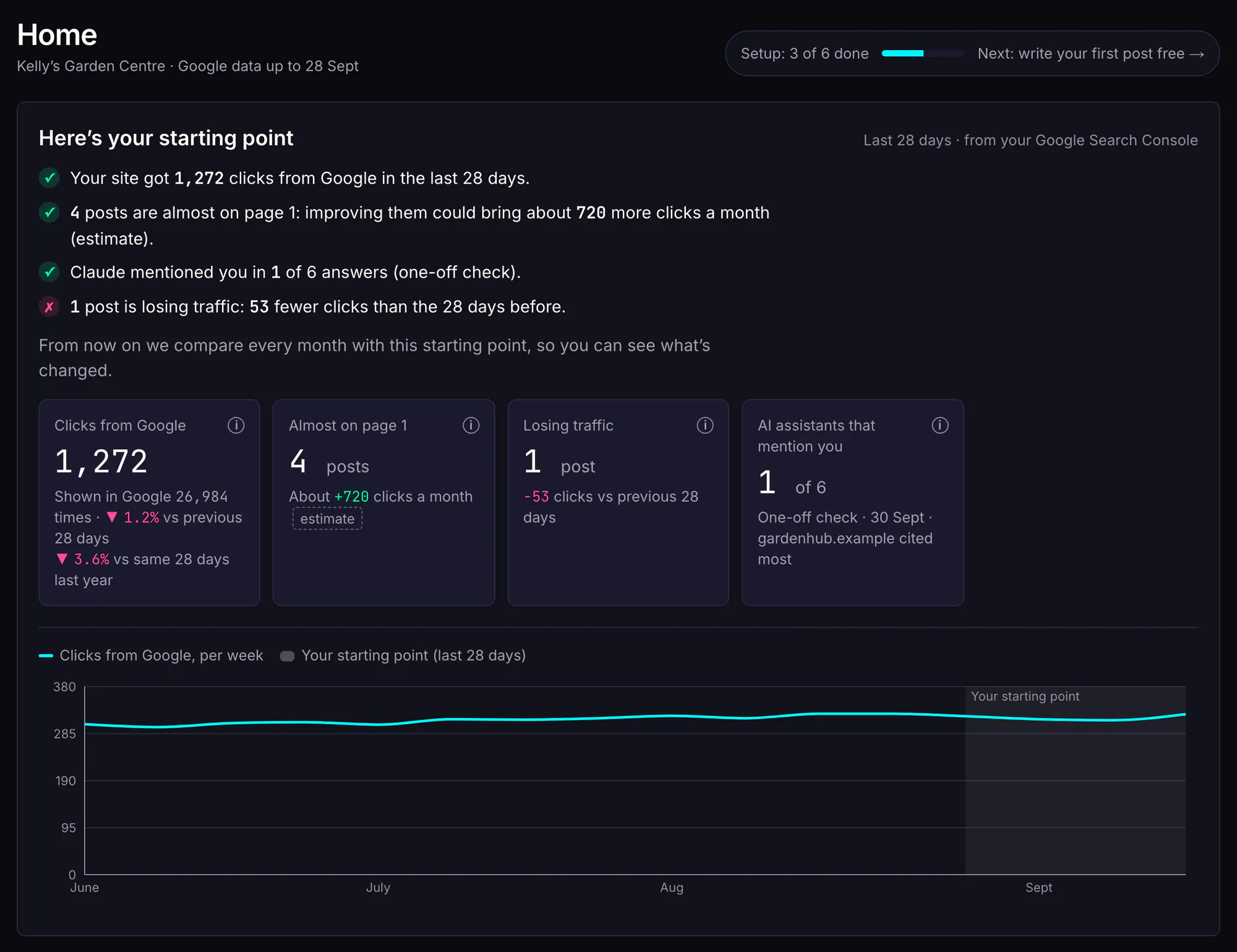
Example data: a fictional garden centre's Home page on its first login. 2. The first few weeks
The first posts are live. Home shows what they've earned so far, and says plainly when it's still too early to judge: new and refreshed posts take weeks to show up in Google.
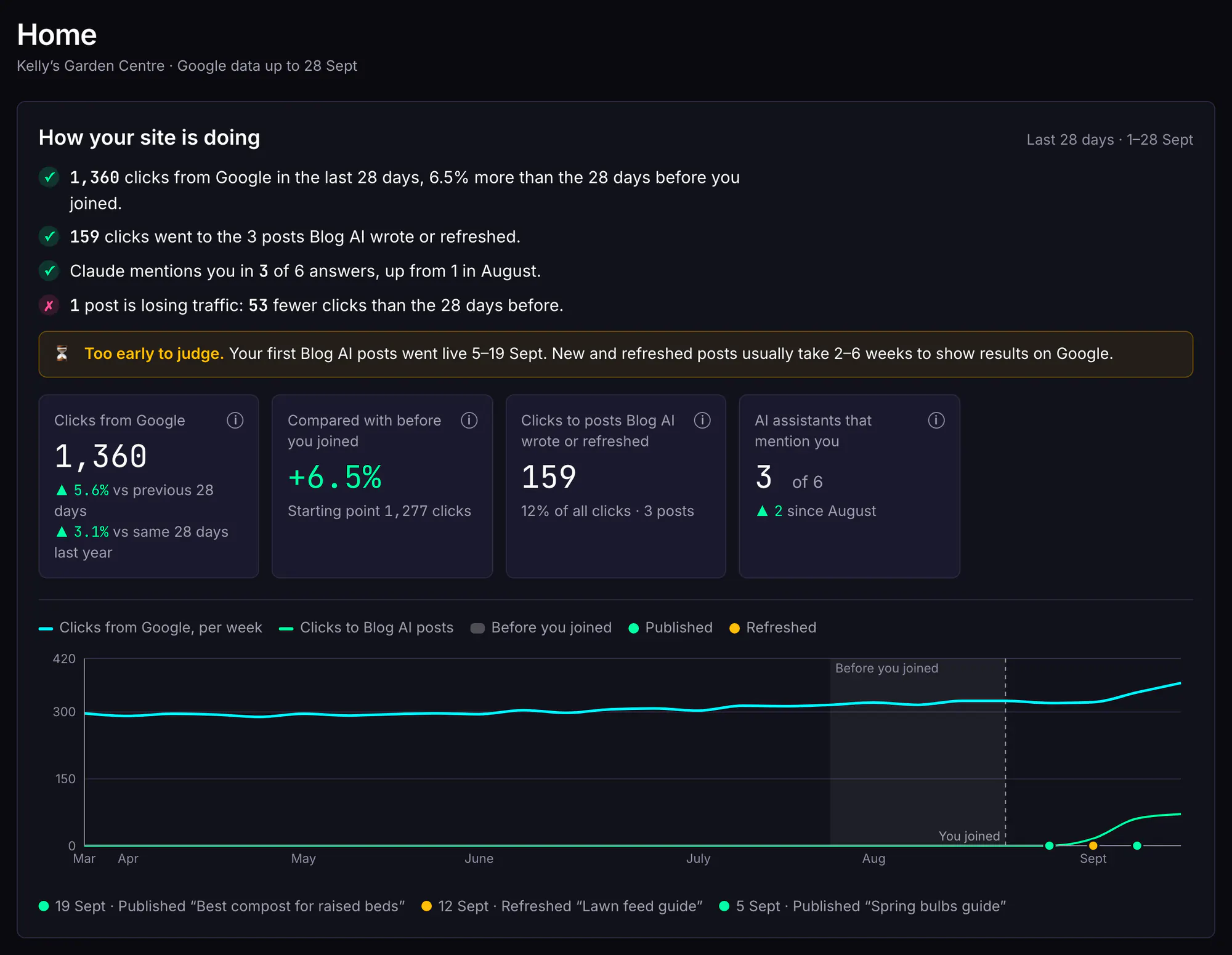
Example data: the same fictional garden centre, a few weeks after joining. 3. A few months in
Results you can check: clicks compared with before you joined, how many went to posts Blog AI wrote or refreshed, and a marker on the chart for every post it published or refreshed.
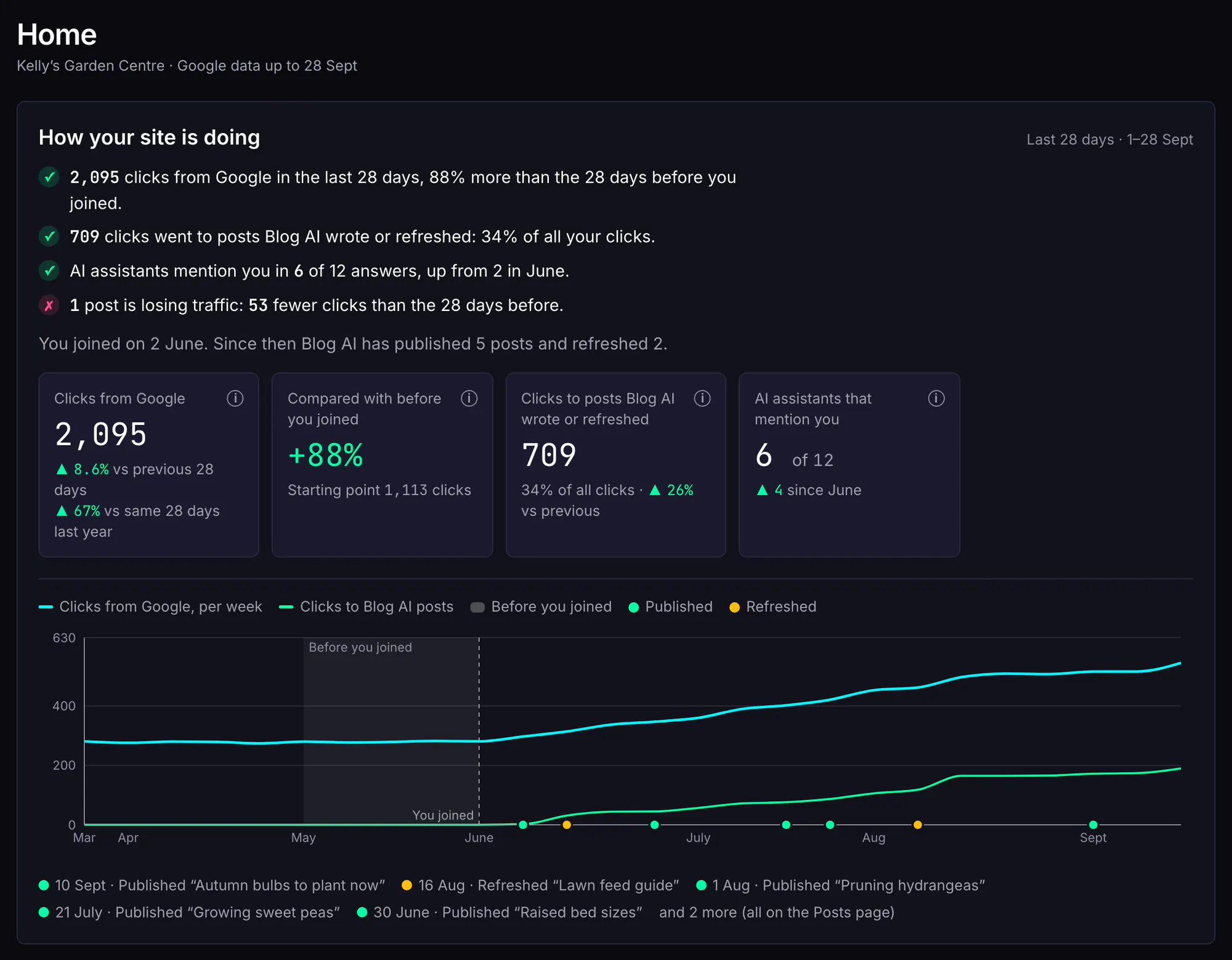
Example data: the same fictional garden centre, a few months after joining. Not a real customer's results.
Setting up (steps 1 to 4)
Sign in with Google
Your Blog AI account uses your Google login, so there's no new password. Signing in only shares your name and email address; access to your search data is a separate step that you choose to take.
Add your site and import your posts
On the Sites page, add your blog. For WordPress, that's your site's address, your username and an application password (a separate password for one tool, which you can revoke at any time). For Strapi, it's an API token and a couple of settings. Blog AI tests the connection before saving.
Then import your posts and pages. Your posts teach Blog AI your voice, give the writer real pages to link to, and go into the content audit. Pages (services, pricing, about) are read-only; Blog AI never edits them. See publishing for exactly what's sent and read.
Connect Search Console and Google Analytics
Blog AI asks Google for read-only access to Search Console and, if you use it, Google Analytics 4. You pick the right property for your site, and Blog AI checks it matches. The first sync fetches recent days first, then works back through up to 16 months of history (3 on the free plan). From then on, it syncs every day.
Set your voice
With 3 or more imported posts, choose “Learn my voice” and Blog AI writes a style guide from them, with example passages and phrases to avoid. You can read and edit all of it. With fewer posts, fill in a short description instead. More on voice learning.
Deciding what to write (step 5)
Most blogs stall on this question. Blog AI answers it from your own data. It compares your last 28 days of Search Console data with the 28 days before and looks for five things: searches where you rank just off the top spots, pages shown often but rarely clicked, posts losing traffic, your own posts competing for the same search, and searches you appear for with no post about them.
Each becomes a card on your Actions page with the numbers behind it, an estimate of the extra clicks a month acting on it could bring, and one button: write, refresh, fix snippet or merge. The biggest opportunities come first. If you'd rather choose from a few topics, ask for a batch of ideas and approve the ones you like. See search opportunities.
The content audit looks at the same data post by post: every published post gets findings and a single recommendation, from “refresh it” to “leave it, it's doing well”.
Writing the post (step 6)
When you start a post, Blog AI runs it as a background job, so you can leave the page and come back. You'll see its progress as it goes: researching, writing, checking.
- Research: the writer searches the web and reads the pages it finds, so facts come from current sources.
- Your site: it reads your existing posts and your Search Console searches, so it links to your real pages and doesn't repeat a post you've already written.
- Your voice: your style guide, example passages and phrases to avoid shape every sentence.
- The draft: in the shape and length that suit what people search for (a cost guide, a step-by-step guide, a comparison and so on; about 1,500 words when there's nothing to go on; you can choose a different shape or length), with headings, inline citations, internal links, a search title and description, an excerpt, a short FAQ and suggested image prompts.
A new post costs 3 credits. The credits are held when the job starts and charged only when the post is ready; if the job fails, they're released.
Checking the facts (step 7)
As soon as the draft is written, a separate checker opens every source the post cites and decides whether it supports the claim. It also reads the whole post for statistics that have no source.
If a statistic isn't supported, or has no source, the post is saved as “needs review” and the fact-check panel shows you the claim, the source and what the source actually says. You mark each flag as removed, rewritten, or checked by you. Until every flag is resolved, the post can't be published or scheduled, and that rule is enforced by the database, not just the button. More on fact-checking.
Reviewing and editing (step 8)
The editor saves as you type, keeps a version history you can compare and restore, and warns you if the same post was changed in another tab. The “SEO & details” panel holds the search title and description (with a Google preview for desktop and mobile), excerpt, slug, categories, tags and canonical address.
In the images panel, generate a featured image or inline images from the suggested prompts, or upload your own. Images are stored in your account, so their links don't expire.
Publishing (step 9)
Publish now, or pick a date and time. WordPress gets a native scheduled post; for Strapi, Blog AI holds the post and sends it at the time. Either way it goes out within a few minutes of the time you pick, and you get an email when a scheduled post is published or if it fails.
The content calendar shows everything that's scheduled and published, with approved drafts waiting in a tray; drag a post to reschedule it. Publishing is free. See publishing.
Measuring and improving (step 10)
Every day, Blog AI syncs your Google data and matches it to your posts. Each post gets a chart with markers for when it was published, refreshed or had its snippet changed, and a before-and-after comparison for each change. The site report shows the whole site, including how posts Blog AI wrote or refreshed compare with the rest, and a weekly email sums up what moved. See performance tracking.
When a post starts to slip, it shows up on your Actions page again, this time as a refresh: a section-by-section proposal, fact-checked like a new post, that you approve before it updates the live post. The address never changes. That's the loop: your data decides what to do next. See content refresh.
What you do, and what Blog AI does
| Stage | Blog AI | You |
|---|---|---|
| Deciding | Reads your Search Console data daily and ranks what's worth doing. | Pick what to act on; dismiss or snooze the rest. |
| Writing | Researches, writes in your voice, cites sources, links to your posts. | Choose the topic; read the draft. |
| Checking | Opens every cited source and flags statistics it can't confirm. | Resolve each flag; the post waits for you. |
| Publishing | Sends the post and its SEO fields to your site, now or on schedule. | Press publish, or pick the time. |
| Measuring | Syncs Google data daily, per post, with before-and-after for each change. | Read the weekly email; decide what's next. |
| Improving | Proposes refreshes, snippet fixes and merges. | Approve the changes you want. |
Blog AI does the legwork; you stay the editor. It isn't a content farm that publishes on its own, and it isn't an all-in-one SEO suite: there's no rank tracker, backlink tool or technical site crawler.
What's free and what costs credits
Finding opportunities, the audit, measuring and publishing are free. Credits pay for the AI work: writing, refreshing, ideas and images. Every button that spends credits says how many before you click.
| Action | Credits |
|---|---|
| A batch of post ideas | 1 credit |
| A researched, fact-checked blog post | 3 credits |
| A generated image | 1 credit |
| A post refresh (rewrite of the parts that need it) | 2 credits |
| A full rewrite of a post in your site's voice | 3 credits |
| Merging overlapping posts into one | 3 credits |
| Better title & description in Google (when your search data shows it's needed) | Free |
| Publishing, scheduling, editing, uploads | Free |
Plans include monthly credits, and unused credits roll over. See pricing.
The AI behind it
Built on the latest AI models, including Claude for writing and Jev (TypeSafe) for fact-checking. The writer and the checker are different models on purpose, so the checker doesn't share the writer's blind spots. We test every change to the writer, checker or models against a fixed set of test posts before it ships.
Questions
How long does it take to get started?
Setting up is a handful of short forms: sign in, add your site, connect Google, set your voice. The first Search Console sync then runs in the background, and your Actions list and audit fill in as the data arrives. A post takes a few minutes to write and check.
Does Blog AI publish anything without me?
No. You choose what gets written, you review every draft, and you press publish or pick the time. Scheduled posts go out at the time you chose. Refreshes are proposals you approve section by section.
What if I don't use Search Console?
Search Console is free from Google, and you can add your site to it in a few minutes. Blog AI needs it for opportunities, the traffic parts of the audit and the free post. Without it, you can still connect your site and use the content checks.
Can I use Blog AI on a brand-new blog?
Yes, with less data to start from. Describe your voice instead of learning it, and expect few search opportunities until Google has shown your site for a while. The ideas, writing, fact-checking and publishing work the same.
Can I run several blogs?
Yes. Without a plan you can have 1 site; the plans include 1, 3, 10 sites. Each site has its own Google connection, voice and reports.
Which AI does Blog AI use?
Built on the latest AI models, including Claude for writing and Jev (TypeSafe) for fact-checking.
Start with the data you already have
Sign in with Google, no card needed. The free plan includes a content audit and one free post once Search Console has synced and you've set your voice. Plans from $49/month.