Content refresh
Fix the posts that are slipping
For blogs with posts that used to do well, or never quite did. Blog AI spots posts that are losing clicks, sitting just off Google's top results or too thin to answer their question, proposes a section-by-section update (or a full rewrite in your voice), checks it, and updates the live post once you've approved each change. The address never changes. Start from any post on your Actions page.
Sign in with Google, no card needed. The free plan includes a content audit and one free post once Search Console has synced and you've set your voice. Plans from $49/month.
Why refresh instead of writing more
Posts decay. Facts go out of date, competitors publish something newer, and Google shows your post less. A post that brought steady clicks last year can quietly lose half of them.
Fixing that post is often the cheapest traffic you can get. It already ranks, already has links pointing at it, and Google already knows what it's about. Writing a new post on the same topic usually makes things worse: now two of your pages compete for the same search.
The hard part is knowing which posts are slipping, and updating them without breaking what still works. Blog AI handles both.
How a refresh works
Step 1: Start the refresh
From your Actions list, the content audit or the post itself. Blog AI builds a brief from the post's findings: the searches it's losing or close to winning, and the content audit's checks, such as a post that's too short or has no Google description. The progress page shows what the refresh sets out to do.
Step 2: Blog AI researches and rewrites what needs it
The writer reads the post section by section, researches what's changed, and marks each section as unchanged, updated, expanded or new. Sections that still work are kept word for word.
Step 3: The changes are fact-checked
Only the changed text is checked against its sources, and any statistic that doesn't check out is flagged on the section it belongs to.
Step 4: You review each change
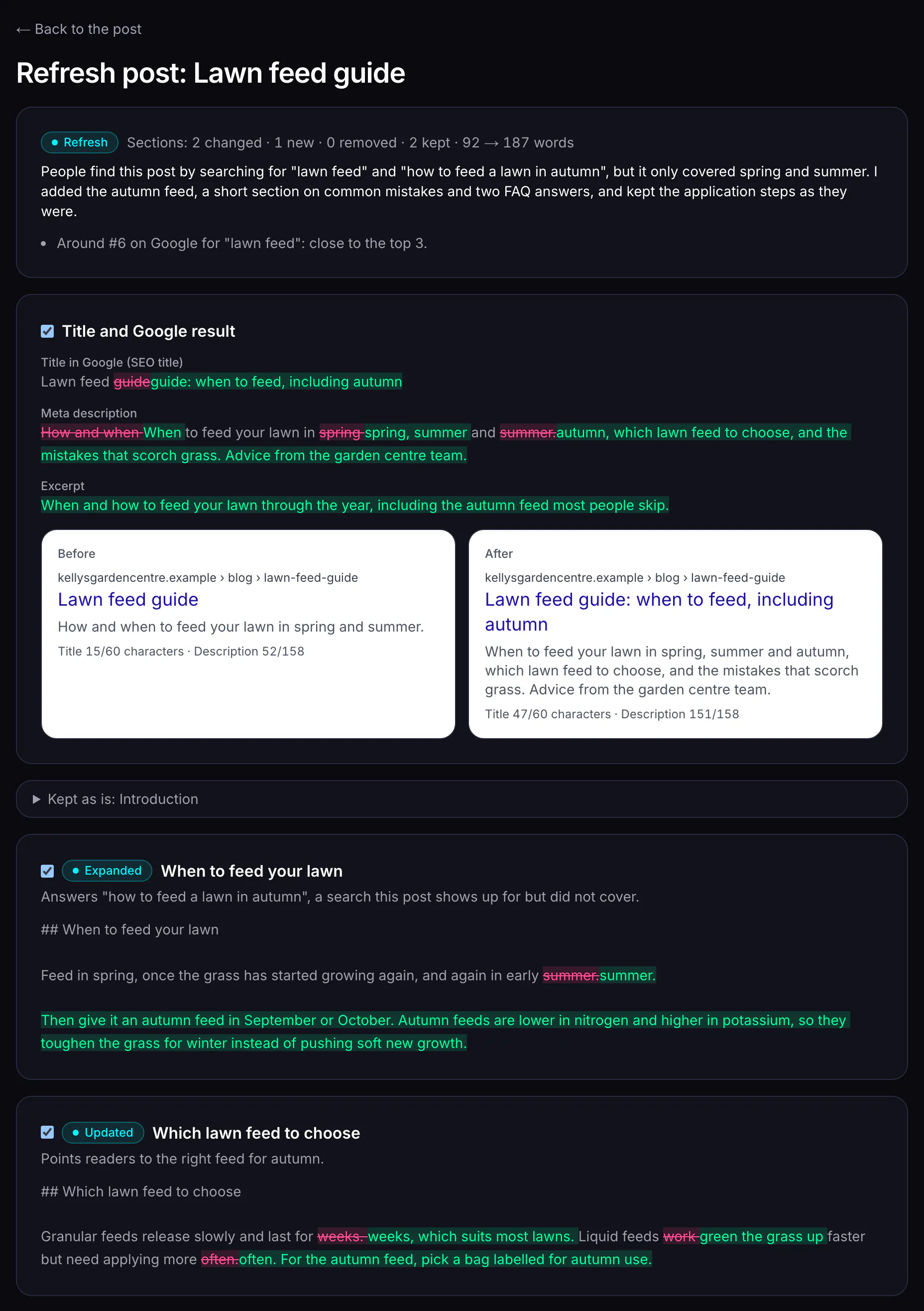
A side-by-side view shows every section before and after, with the words that changed highlighted and a reason for each change. Accept all, accept some, or reject the proposal.
Step 5: Blog AI updates the live post
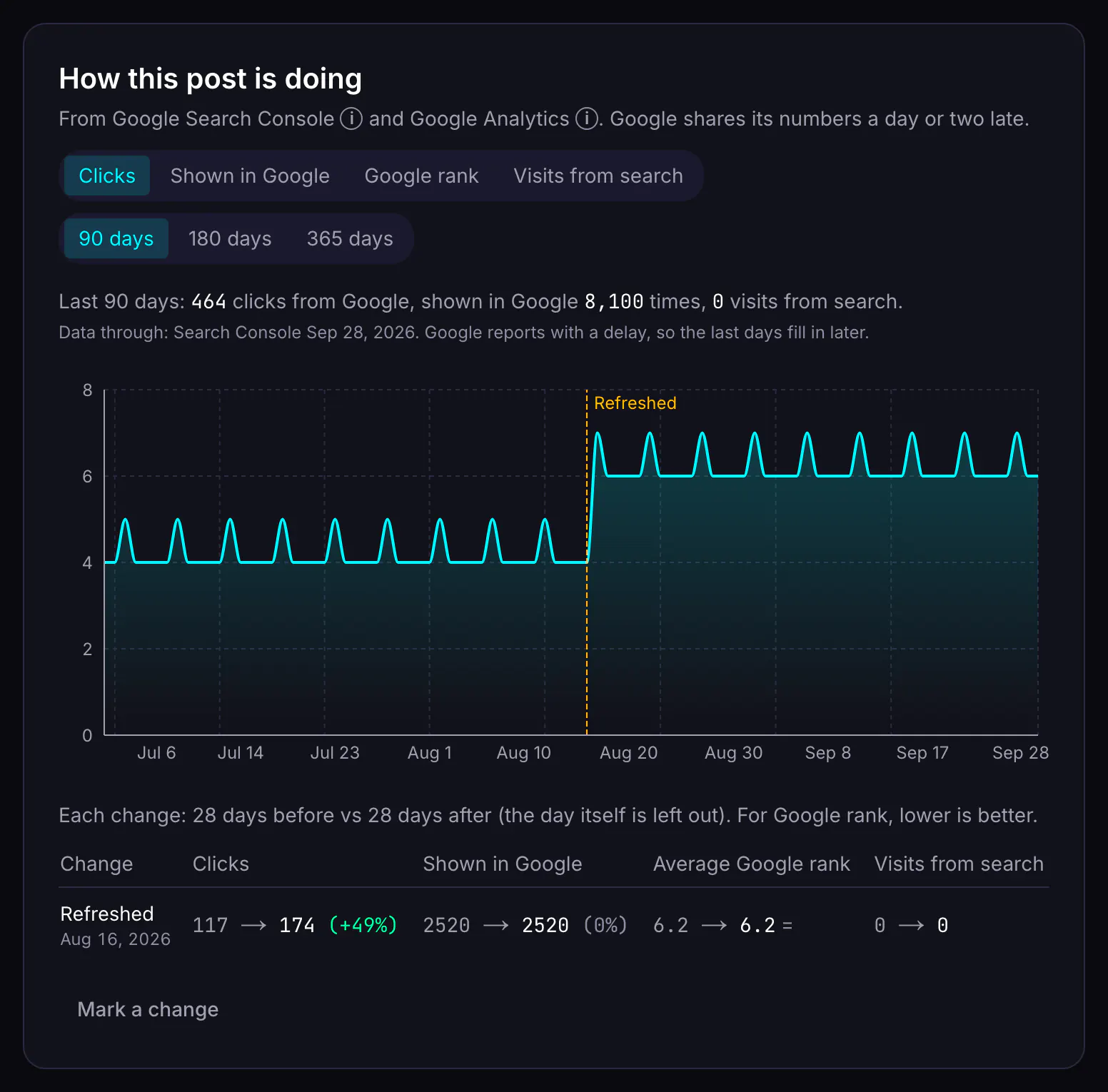
Applying sends the accepted changes to WordPress or Strapi first, then saves them in Blog AI. The post keeps its address, and a marker goes on its performance chart.
Short and weak posts, not just search problems
A refresh doesn't only follow Search Console. It also uses the same checks as the content audit, so a post with little search data still gets a real update:
- Under 600 words: expanded so it fully answers its main question, with the steps, examples and pitfalls a reader needs. No padding.
- No Google description: one is written, including the main search and what the reader gets.
- No links to your other posts: two or three links to genuinely related posts are added where they help the reader.
- No search data yet: the post is worked to editorial good practice, answering the question early, with clear headings and sourced facts.
If you've told Blog AI what your site is for, the refresh writes for those readers and that goal. See what your site is for.
Rewrite post
When the writing itself is the problem, use Rewrite post instead (3 credits). Blog AI treats the old post as source material and writes every section again in your site's voice and for what your site is about. It keeps the topic, the facts that are still correct (checked again), your images and useful links, and cuts filler and vague claims. The proposal is marked “Full rewrite” and shows each section before and after, with word counts, and you review and apply it the same way as a refresh. The post keeps its address.
Reviewing the proposal
The review page is built for deciding quickly. For each section you see the old text, the new text with changed words highlighted, what kind of change it is (updated, expanded, new or removed) and a one-line reason. Above the sections are the title, SEO title, search description and excerpt, before and after, and a word count for the whole post.
- Accept everything in one click, or tick the sections you want.
- Sections you don't accept stay exactly as they are on your site.
- A section with a fact-check flag can't be applied until the flag is dealt with. Reject that section and apply the rest.
- Reject the whole proposal if it isn't right. Nothing on your site changes.
Built not to break your live post
A refresh edits a real page on your site, so the rules are strict. Blog AI reads the live post first and refuses to write if someone changed it on your site since the proposal was made, or if it contains things a rewrite would lose (embeds, shortcodes, custom blocks, tables, special link settings). It then sends only the title, body and excerpt, and leaves the address, publish state, categories, tags and featured image alone.
The version before the refresh and the version after are both saved in the post's history, and the “refreshed” marker on its performance chart starts a before-and-after comparison. See performance tracking.
Fix the snippet, not the post
Sometimes the post is fine and the problem is what people see in Google. A post on page one that is shown often but rarely clicked (a click rate under 50% of what's usual for its position) gets a “Better title & description in Google” suggestion instead of a refresh, once it's at least four weeks old. So does a post with no Google description at all.
It's free. Blog AI shows you the current search title and description, then writes 3 alternatives with a Google preview of each, at most once a month per post. Pick one, tweak it if you like, and apply. Only the SEO title and description are sent to your site; the post itself isn't touched. On WordPress this needs Yoast (with the Blog AI Connector plugin) or Rank Math.
Merge posts that compete with each other
When two or more of your posts keep swapping places for the same search, neither does as well as one strong page would. SEO people call this cannibalisation. Blog AI spots it in your Search Console data and suggests a merge: keep the page with the most impressions (then the better position), and fold the best of up to 3 other posts into it.
What happens to the other posts
Blog AI never deletes or unpublishes them. The merged posts should redirect to the kept one, so their visitors and links carry over. If your WordPress site uses the Redirection plugin, Blog AI can create those redirects when you apply, if you choose to. Otherwise it gives you the exact list to add.
What it costs
You're charged when the proposal is ready, not before. If it fails, the credits held for it are released. Reviewing and applying a proposal is free.
| Action | Credits |
|---|---|
| Refresh a post (research, rewrite of the parts that need it, fact-check) | 2 credits |
| Rewrite a post in full, in your site's voice | 3 credits |
| Better title & description in Google (a choice of options) | Free (when your search data shows it's needed) |
| Merge competing posts into one | 3 credits |
| Review, apply or reject a proposal | Free |
A refresh costs less than a new post because it keeps the parts that already work; a full rewrite costs more than a refresh because every section is researched and written again. See pricing.
What it doesn't do
- It never changes a live post's address, and never deletes or unpublishes posts on your site.
- It won't overwrite edits made on your site since the post was imported. You re-import first.
- It can't rewrite posts built from embeds, shortcodes, page-builder blocks or tables, because it can't reproduce them faithfully. You can still fix their search snippet.
- It doesn't send the post's FAQ to your CMS. An accepted FAQ change is saved in Blog AI only, and the review page says so.
- It doesn't promise a recovery. It shows you the before-and-after, so you can judge.
- It won't apply a change with an unresolved fact-check flag. Reject that section and apply the rest.
Questions
Will refreshing change my post's URL?
Never. A refresh has no slug to change. Blog AI updates the title, body and excerpt (and the SEO title and description, if you accept new ones); the address, categories, tags and featured image stay as your site has them.
What if I've edited the post in WordPress since it was imported?
Blog AI reads the live post before it writes anything. If it no longer matches the version the proposal was based on, Blog AI stops and asks you to re-import, so your edits are never undone. It also refuses to rewrite posts with content it can't reproduce, such as embeds, shortcodes or custom blocks, and offers a snippet fix instead.
Can I undo a refresh?
The version before the refresh is saved in the post's history, so you can compare and restore it in Blog AI and then update the live post. Blog AI doesn't restore your CMS's own revisions.
Do I have to accept the whole proposal?
No. Accept the sections you like and leave the rest; unaccepted sections stay exactly as they were. You pay for the proposal, not for how much of it you use.
Does merging delete my other posts?
No. Blog AI never deletes or unpublishes posts on your site. After a merge, the merged posts should redirect to the one you kept: on WordPress with the Redirection plugin, Blog AI can add those redirects if you ask it to; otherwise it lists the exact redirects to set up.
How do I know which posts need a refresh?
Your Actions list and the content audit flag them: posts that have lost 25% or more of their clicks, posts ranking just off the top spots, posts shown often but rarely clicked, and short posts. Each post's "Why isn't this performing?" check also recommends a refresh or a rewrite when that's the fix.
Should I refresh a post or rewrite it?
Refresh when the post is basically good but out of date, too short or missing searches people make: it keeps the sections that still work. Rewrite when the writing itself is the problem (vague, padded, unsourced, or no longer about what your business does): every section is written again in your site's voice. Both are reviewed side by side before anything changes on your site.
Start with the data you already have
Sign in with Google, no card needed. The free plan includes a content audit and one free post once Search Console has synced and you've set your voice. Plans from $49/month.