Performance tracking
See what every post did
For owners who publish and then wonder whether it worked. Blog AI pulls your Search Console and Google Analytics data every day and puts it next to each post: a chart with a marker for every change, a before-and-after for each one, and a site report in plain English. Connect Google once; the numbers keep coming. It's free.
Sign in with Google, no card needed. The free plan includes a content audit and one free post once Search Console has synced and you've set your voice. Plans from $49/month.
Publishing is only half the job
Most blogs publish and hope. Finding out whether a post worked means cross-referencing Search Console, Analytics and the date you published, and few people have time for it every week.
Blog AI does the cross-referencing. It matches your Google data to your posts by their web address, keeps a record of every change it made, and shows you the result in one place, in plain English: “times shown in Google” rather than “impressions”, “click rate” rather than “CTR”.
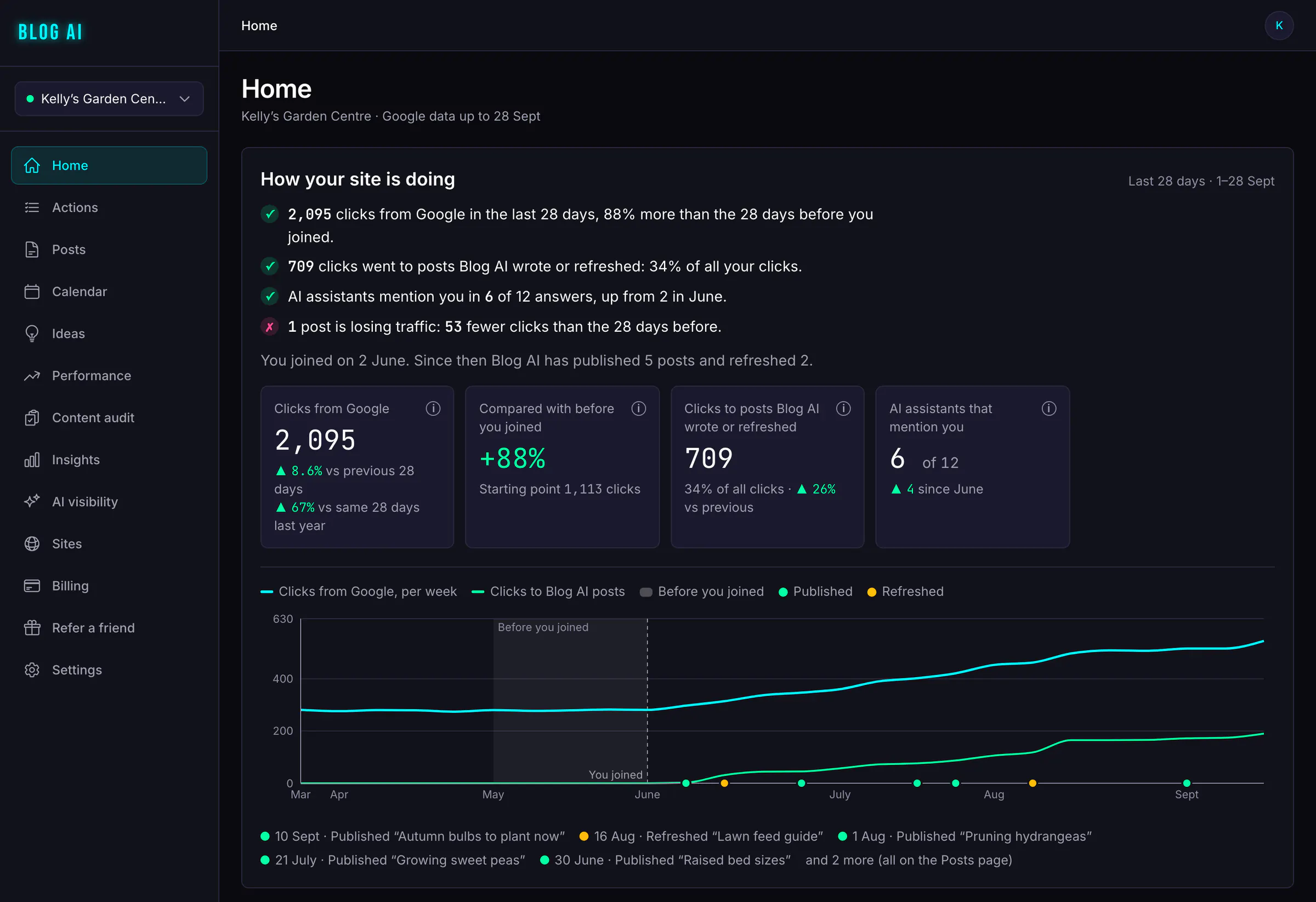
Your Home page leads with the answer: clicks from Google compared with before you joined, how many went to posts Blog AI wrote or refreshed, and a weekly chart with a marker for every post it published or refreshed.
A chart for every post
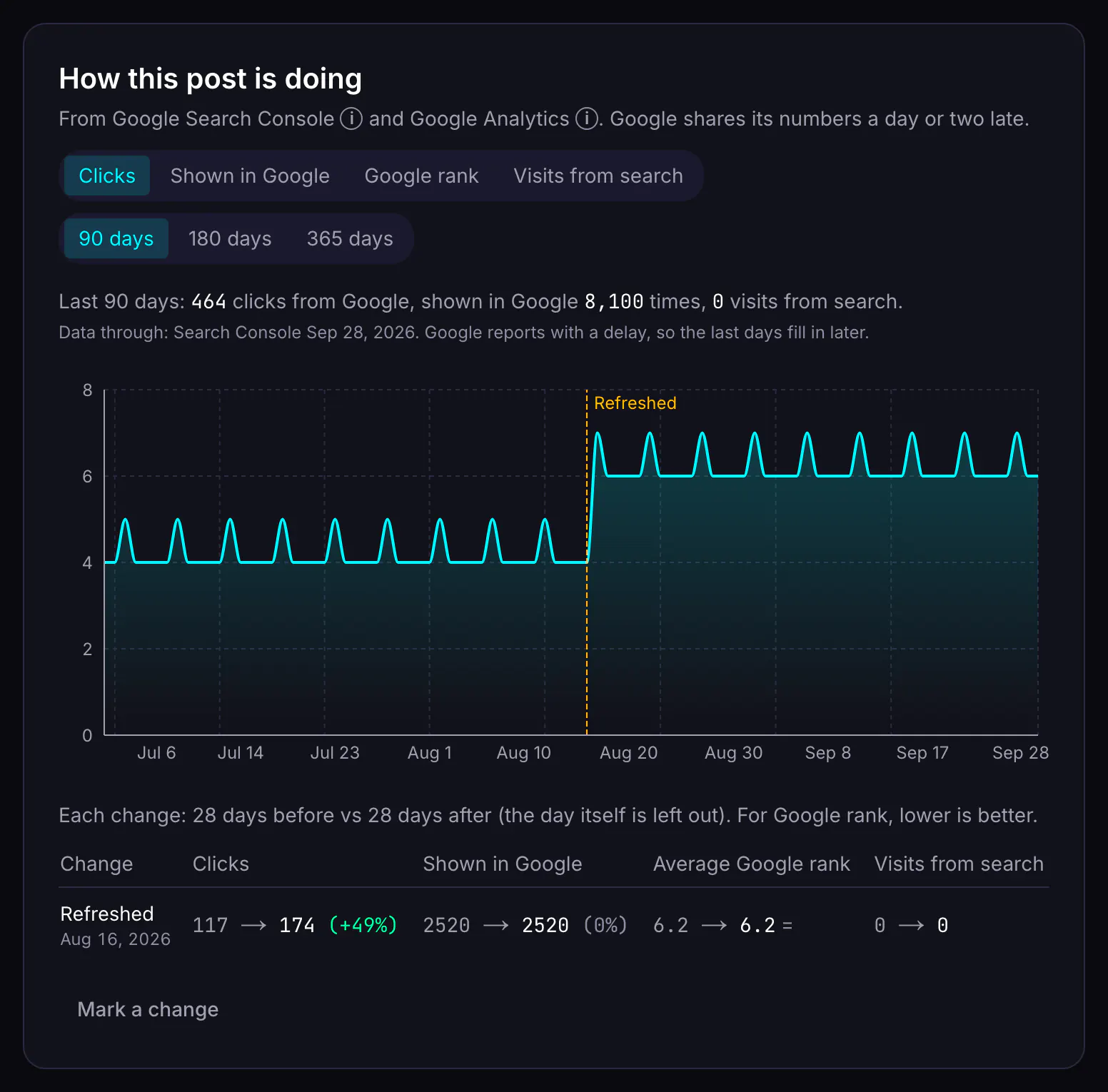
Every published post has a performance card with a daily chart over the last 90, 180 or 365 days. Switch between clicks, times shown in Google, position, and (with Google Analytics) visits from search.
A marker for every change
The chart marks the day a post was published, refreshed, had its search snippet changed, or was unpublished. Blog AI records these itself when it makes the change. If you changed something outside Blog AI (a new title written in WordPress, say), add your own marker with a note.
Before and after, for each change
For each marker, Blog AI compares the 28 days before with the 28 days after, leaving out the day itself, and shows the change in each measure. Until all 28 days after the change have been reported, it tells you how many days it has so far.
Why isn't this performing?
On its page, each post also says in plain English why it isn't doing better: it isn't about what your business does, it's weakly written (with the weak points named), it has a search problem, or it's too new to judge. It recommends one next step, such as a refresh or a rewrite, and it's free. See how posts are diagnosed.
The site report
The Performance page covers your whole site, including the homepage and pages that aren't blog posts. Pick the last 28, 90, 180 or 365 days, or your own dates, and compare with the period before.
| Section | What it shows |
|---|---|
| Headline figures | Clicks, times shown, click rate and average position from Search Console; sessions and engagement from Google Analytics; each with the change on the period before. |
| Daily chart | Every day of the range, one line per measure. |
| Blog AI posts vs everything else | Posts Blog AI wrote, plus posts it refreshed (from the day of the first refresh), against the rest of the site. |
| Top pages | Your best pages for the period, with their numbers. |
| Top searches | The searches that brought people to your site. |
| Devices and countries | Where your search visitors are, and what they use. |
Each source shows the date its data runs to. When the previous period isn't fully synced yet (early on, while history is still loading), the report says the comparison may be overstated rather than show a misleading jump. You can download the daily figures and the pages table as CSV.
Content scores
Each post gets a score out of 100 based on its last 28 days, so you can see at a glance which posts pull their weight. It's built from up to six parts:
- Search visibility: how often the post is shown, compared with your other posts.
- Keyword coverage: how many searches it ranks for, weighted by position.
- Organic traffic: search visitors from Google Analytics, compared with your other posts.
- Engagement: how engaged those visitors are, and for how long.
- Conversions: key events (the actions you track in Google Analytics) per visit.
- Trend: whether traffic is rising or falling.
A part with no data is left out and the rest are re-weighted. A post with no search data at all gets “not enough data”, not a made-up number.
The weekly email
Every Monday, Blog AI emails you a short summary for each site: what was published that week, the posts whose clicks moved most (with the dates being compared), and how many suggestions are waiting for you. If nothing happened, it doesn't send one. You can turn it off in your settings, or with the unsubscribe link in any digest.
From measuring to acting
The same data feeds your Actions list. A post that's slipping becomes a refresh suggestion, a post that's shown but not clicked gets a better title and description (free), and searches you appear for without a post become new ideas. See search opportunities.
What it costs
Measuring is free, on every plan and on the free plan. There's no charge to see charts, reports, scores or the weekly email.
| What | Credits |
|---|---|
| Per-post charts and before-and-after | Free |
| Site performance report and CSV export | Free |
| Content scores | Free |
| Weekly email | Free |
Acting on what you see costs credits as usual (refreshing a post; a better title and description in Google is free); see content refresh and pricing.
What it doesn't do
- It isn't a rank tracker. Positions are Google's own averages from Search Console, not daily checks of the results page.
- It doesn't track backlinks, page speed or technical SEO.
- It only sees organic search visitors from Google Analytics. Social, email and paid traffic aren't in the post scores.
- It can't tell you why a number moved, only when and by how much. The markers help you connect a change to a result.
- There's no branded client report or multi-site roll-up yet. Agencies can export CSVs per site.
Questions
Do I need Google Analytics as well as Search Console?
No, but it helps. Search Console tells you how posts do in Google: times shown, clicks and position. Google Analytics 4 adds what visitors from search did next: sessions, engaged sessions and key events. Without it, those parts of the report and scores are left out rather than guessed.
Why don't the numbers match Search Console exactly?
Clicks should be very close. Impressions can be a little higher in Blog AI, because we add up pages the way Search Console's Pages tab does, and a single search that shows two of your pages counts twice. Search Console also hides rare searches, so the top searches list never adds up to your total clicks.
Does it track posts that Blog AI didn't write?
Yes. Every page with search data is in the site report, and every post you import gets its own chart. The report also splits posts Blog AI wrote or refreshed from everything else, so you can compare.
How up to date is the data?
Blog AI syncs every day. Search Console publishes its data a few days late, and Google Analytics a little sooner, so each source shows its own "data through" date. Charts stop at that date instead of dropping to zero.
Can I send the report to a client?
You can export the site report's daily numbers and top pages as CSV, and the content audit as CSV or a printable page. There's no branded client report yet.
Does performance tracking cost credits?
No. The performance report, post charts, scores and the weekly email are free, including on the free plan.
Start with the data you already have
Sign in with Google, no card needed. The free plan includes a content audit and one free post once Search Console has synced and you've set your voice. Plans from $49/month.