Grow the whole site
Grow the whole site, not just the next post
For owners who want each post to lift the rest of the blog. Every new post gets linked in from older posts that already get visits. Blog AI groups your searches into topics, shows where you're thin, balances ideas across your whole business, and keeps an eye on the posts you already have.
Sign in with Google, no card needed. The free plan includes a content audit and one free post once Search Console has synced and you've set your voice. Plans from $49/month.
Every new post gets linked in from posts that already get visits
A new post with no links pointing to it is hard for Google, and readers, to find. The posts that already get visits are the best place to link from.
After you publish, Blog AI suggests adding a link to the new post from up to 3 older posts that already get visits for related searches. Each suggestion changes one sentence, you see it highlighted, and nothing changes until you click Apply. It's free.
See where you're covered, thin or overlapping
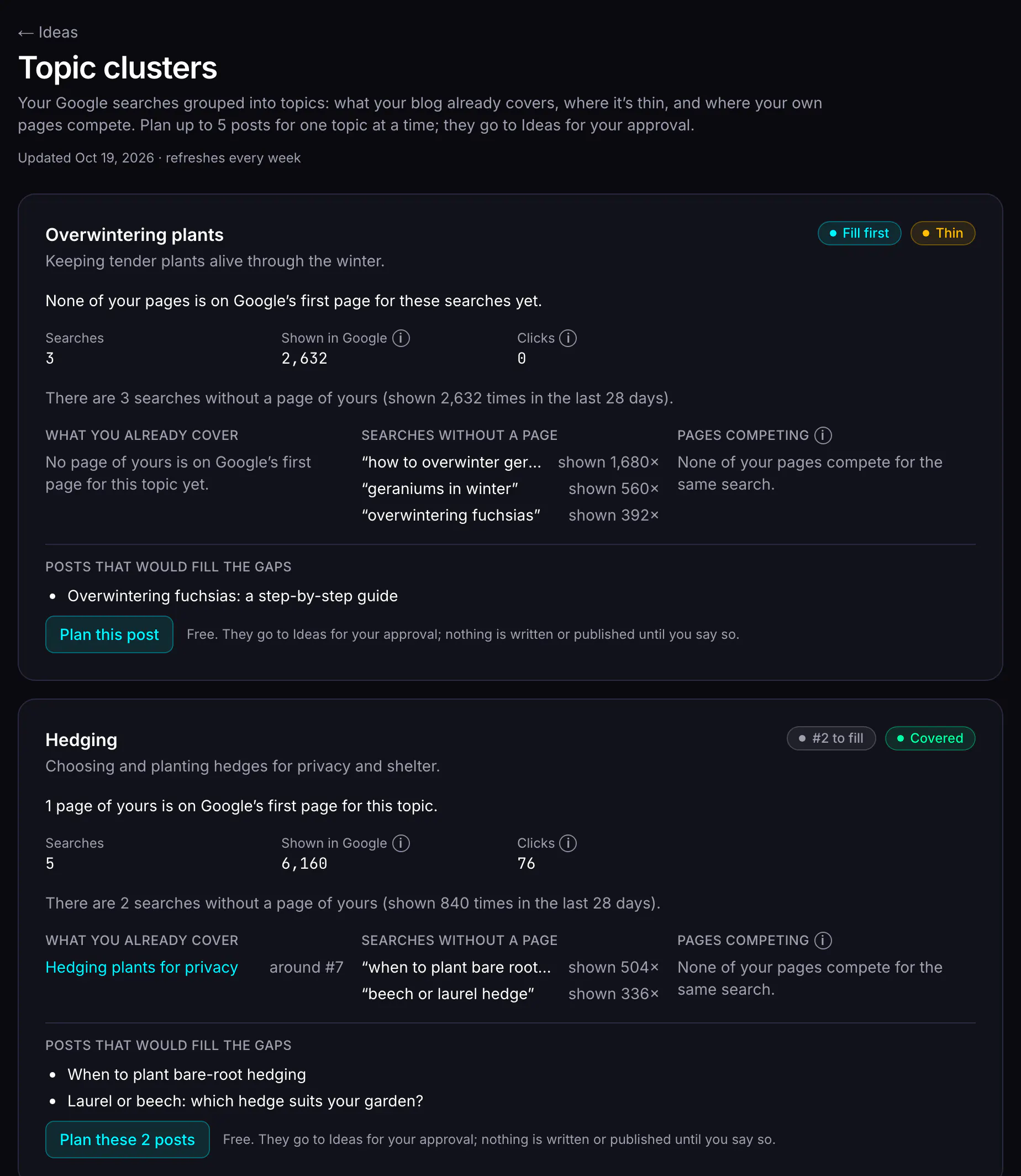
The Topic clusters page groups the searches your site appears for into topics, so you can see your blog the way Google does.
- Covered: your pages are on Google's first page for this topic.
- Thin: people search for it, but none of your pages is on the first page yet, or many of its searches have no page of yours near the top.
- Overlapping: your pages compete with each other for the same searches, so Google splits the clicks between them.
Topics are ranked by what brings you visits and conversions. Plan up to 5 posts for a topic in one click: they go on your Ideas page, and nothing is written until you choose to.
Ideas balanced across your whole business
Ideas that only chase last month's clicks end up circling the same few topics. Each batch is a mix instead: about half from what people search for, about a third for parts of your business you haven't written about lately, and the rest building on topics that already bring visitors. The Balance panel shows each area's last post, posts in the last 90 days and clicks, and lets you set an area to high, normal, low or off. Auto-schedule avoids putting two posts on the same topic back to back. See how ideas are chosen.
Look after the posts you already have
The content audit
Every published post gets findings and one recommended action: refresh it, improve how it looks in Google, merge it with a post it competes with, remove it, or leave it alone. It's free. See the content audit.
Refresh what's slipping
A post that's losing clicks, or too thin to answer its question, gets a section-by-section update you approve change by change, fact-checked like a new post. Its address never changes. See content refresh.
Keep it going
Turn on auto-schedule and Blog AI places ready posts in your next free slot; if your blog goes quiet, it emails you ideas ready to write. See publishing and scheduling.
What it costs
Seeing the gaps and linking posts together is free. You spend credits only when Blog AI writes something.
| What | Credits |
|---|---|
| Link it in (suggest and apply links from older posts) | Free |
| Topic clusters, and planning posts for a topic | Free |
| The Balance panel on the Ideas page | Free |
| A batch of ideas | 1 credit |
| Writing a planned post | 3 credits |
| Refreshing a post that's slipping | 2 credits |
See pricing.
What it doesn't do
- Link it in suggests links from your published posts only, and only from posts that get visits for related searches. A brand-new blog with few posts will get few suggestions.
- Topics come from searches your site already appears for. It doesn't research topics nobody has found you for yet, or look at competitors' sites.
- Nothing is automatic: you apply each link, approve each idea and choose what gets written.
- It doesn't build links from other websites (backlinks).
Questions
Does Link it in change my old posts by itself?
No. Each suggestion changes one sentence in one older post, and you see the change highlighted first. Nothing changes on your site until you click Apply, and you can skip any suggestion.
Where do the topics come from?
From your own Search Console data: the searches your site already appears for, grouped by what they're about. A site with little search data will see only a few topics, or none yet.
Does planning posts for a topic write them?
No. Planning adds up to 5 ideas to your Ideas page for you to approve or reject. Nothing is written until you choose to, and each post costs 3 credits as usual. A topic plans its next batch only once the last one has been written or rejected, so you add posts in small steps, never in a mass dump.
What does this cost?
Link it in, the Topic clusters page, planning posts and the Balance panel are free. You spend credits when you act: 1 credit for a batch of ideas, 3 credits for a post, 2 credits for a refresh.
Start with the data you already have
Sign in with Google, no card needed. The free plan includes a content audit and one free post once Search Console has synced and you've set your voice. Plans from $49/month.